
Upgrading from RebelGive to Nucleus Giving
Every RebelGive church is eligible to upgrade to Nucleus Giving at no additional cost! (Plus, we have a few free gifts for our RebelGive churches.)
What is Nucleus Giving?
Simply put, it's everything you love about RebelGive, but we've upgraded and fine-tuned almost every piece based on the top feature and improvement requests from all the churches using RebelGive. 💜🎉
Isn't it a pain to switch?
Nope! All of your church's giving data and donor historical records come with you (with zero effort) when you upgrade to Nucleus. And yes, we mean everything. Your recurring giving will remain intact, and your congregation won't need to create new logins.
In fact, the transition is so smooth and easy to communicate that many churches have told us their congregation didn't even notice the difference at first. And as a safeguard, if a donor logs in to RebelGive after you've switched to Nucleus, they'll still see all their information, in case they miss the memo from your church or forget. No one gets left behind when you upgrade! 🙌
A few of the major improvements
There are so many we can't list them all, but here are some highlights:
- More robust giving stats on every transaction and transfer list
- More robust transfer (payout) management, including mark as done when reconciling transfers
- Collect more contact information from donors right in the GivingFlow with SmartContact upgrades
- Robust fund management pages
- Add descriptions to funds (designations)
- Custom Flows for taking payments
- Ability to limit GivingFlow methods (e.g. bank giving only)
- More robust donor and people database management
- Plus a lot more, including a host of brand-new (some free!) Nucleus admin and congregation tools
Ready to get started?
Email our team and we'll be glad to answer any questions you have and begin the migration process. Or keep reading to learn more about this change.
The history of RebelGive (and why we made this change)
Our company launched RebelGive in March 2019. In just a few short years, churches using RebelGive have saved well over $6 million combined*
*This is a stat from 2024. This has only increased since then.
So why launch Nucleus Giving?
To put it plainly: it's easier to have our products under one name and in one dashboard. That makes everything easier to explain and build, and it lets us deliver features and improvements more quickly.
The new dashboard and back-end systems we built for Nucleus 2 are also much more powerful and expandable. It really is as simple as that.
What else you need to know
- The product framework and payment processing that power RebelGive are identical to Nucleus Giving.
- The company behind RebelGive is the same company behind Nucleus Giving. We share the same values, and we're the same people serving your church. None of that has changed.
So why make the switch at all?
As a RebelGive user, you'll find that Nucleus Giving comes with an array of new benefits and features. We mentioned a few above. Here's a closer look.
The extra benefits of Nucleus Giving
Below is an extensive (though not exhaustive) list of what's available in Nucleus Giving that you won't find in RebelGive.
More robust giving stats on every transaction and transfer list
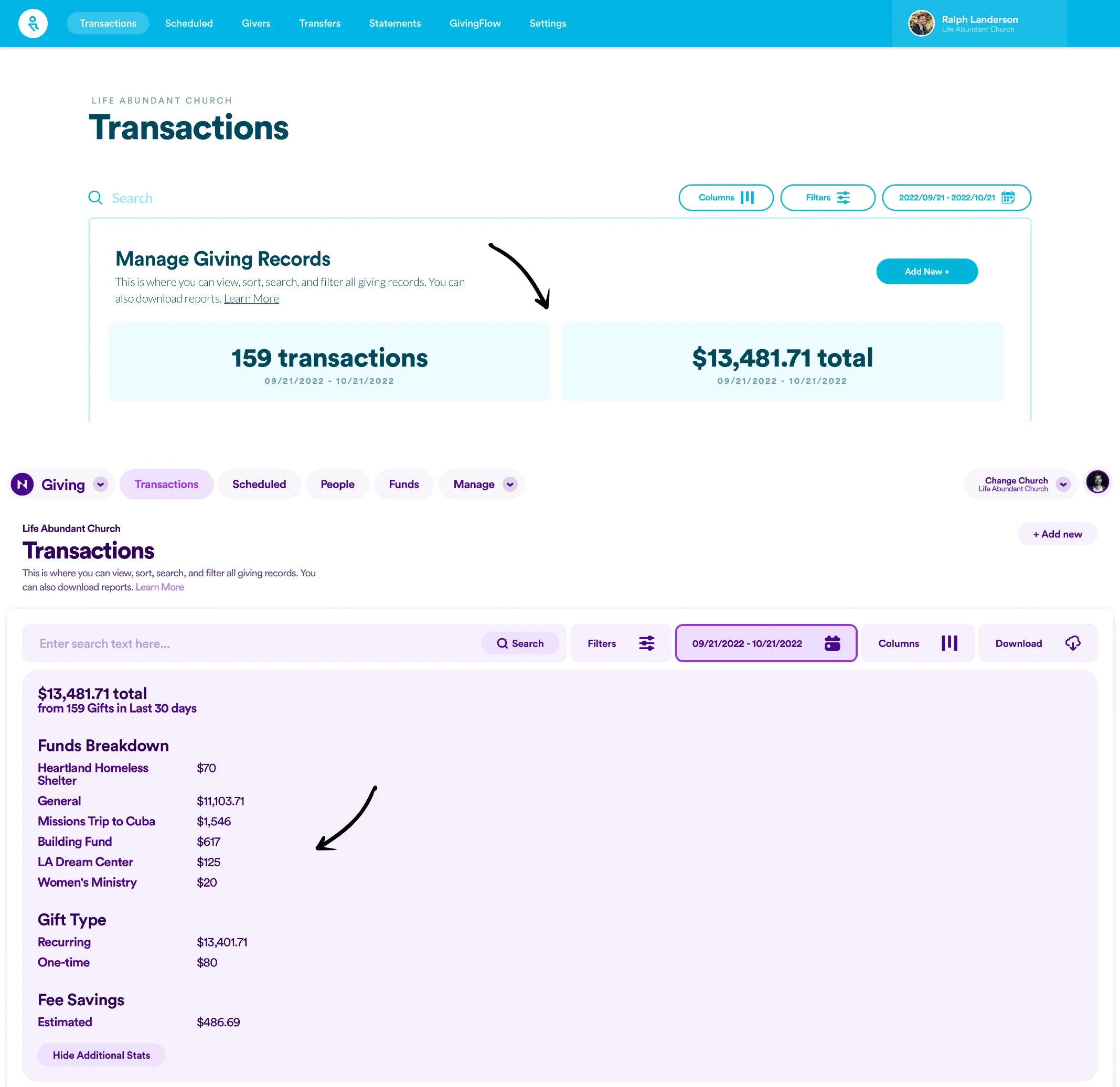
In Nucleus Giving, all stats respond to filters, text search, date ranges, and more for highly fine-tuned results. You can see metrics like per-fund totals per week, one-time vs. recurring giving, totals per payment method, and even your fee savings.
More robust transfer (payout) management
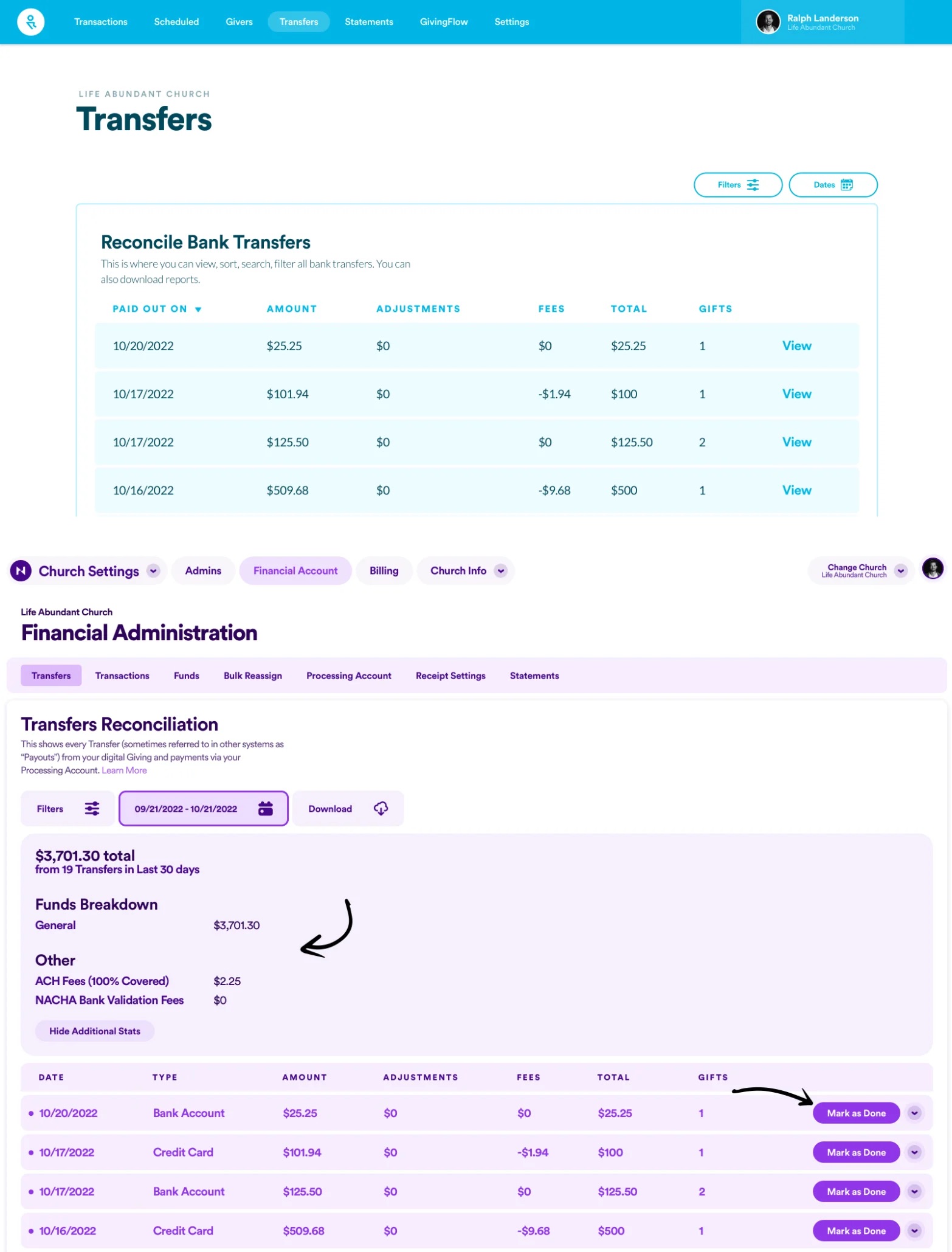
This was a top admin request, and we delivered a much more powerful, easy-to-understand Transfers area, including the ability to mark transfers as done when reconciling. You can download a list of transfers by date range or filter, for example to see only ACH (bank giving) or credit card transfers. You can also pull stats for a range of transfers, including amounts given per fund.
You'll also find other financial controls in the new Financial Account area. You can even grant access to your CPA (or other finance team members) without giving them access to your Giving area.
Robust fund pages
Easily see transactions, scheduled and recurring giving, and the people who've given to a specific fund.
Collect more contact information with SmartContact
Does your church need donors' phone numbers, emails, or physical addresses? You can now require that information to complete a donation.
Fund descriptions
Donors can view fund descriptions in the GivingFlow to learn about the different funds as they give. This was another top request.
Custom Flows for taking payments (and anything else!)
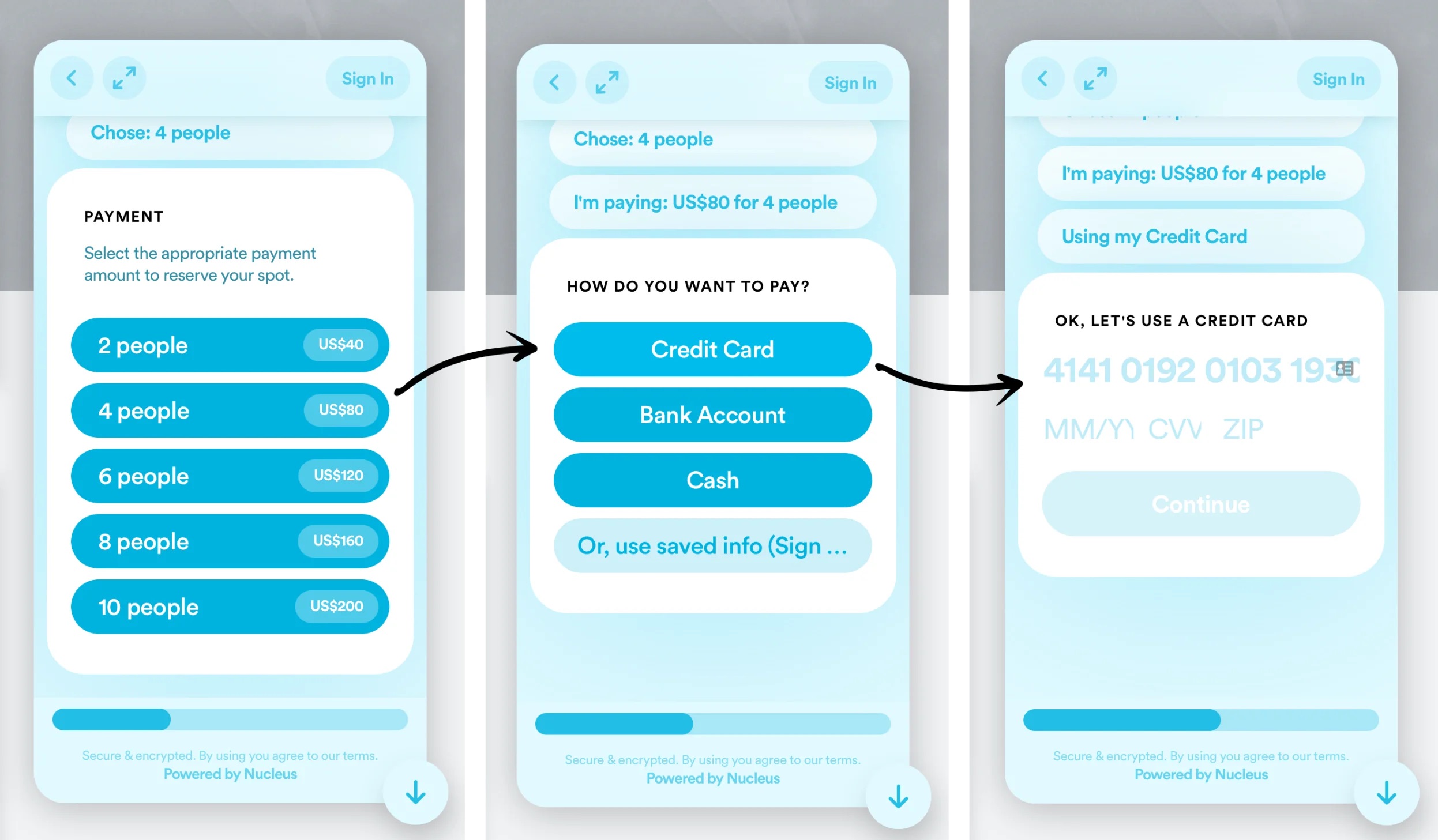
No more workarounds like hidden funds and trigger links to take payments. Nucleus Giving includes fully custom Flows for taking payments (you can even set limits), all powered by Nucleus Flows and your existing RebelGive processing account.
Limit giving methods (e.g. ACH bank giving only)
Instead of always letting donors choose between credit card and ACH, you can now offer just one option if your church prefers (usually bank giving only).
A unified people database (including lists and profile notes)
Have one centralized people database for everything, not just donors. Organize people into lists automatically by connection type (e.g. Member, Regular Attender, Visitor), or build lists manually and manage each person's record with your church.
Improved transaction details and controls
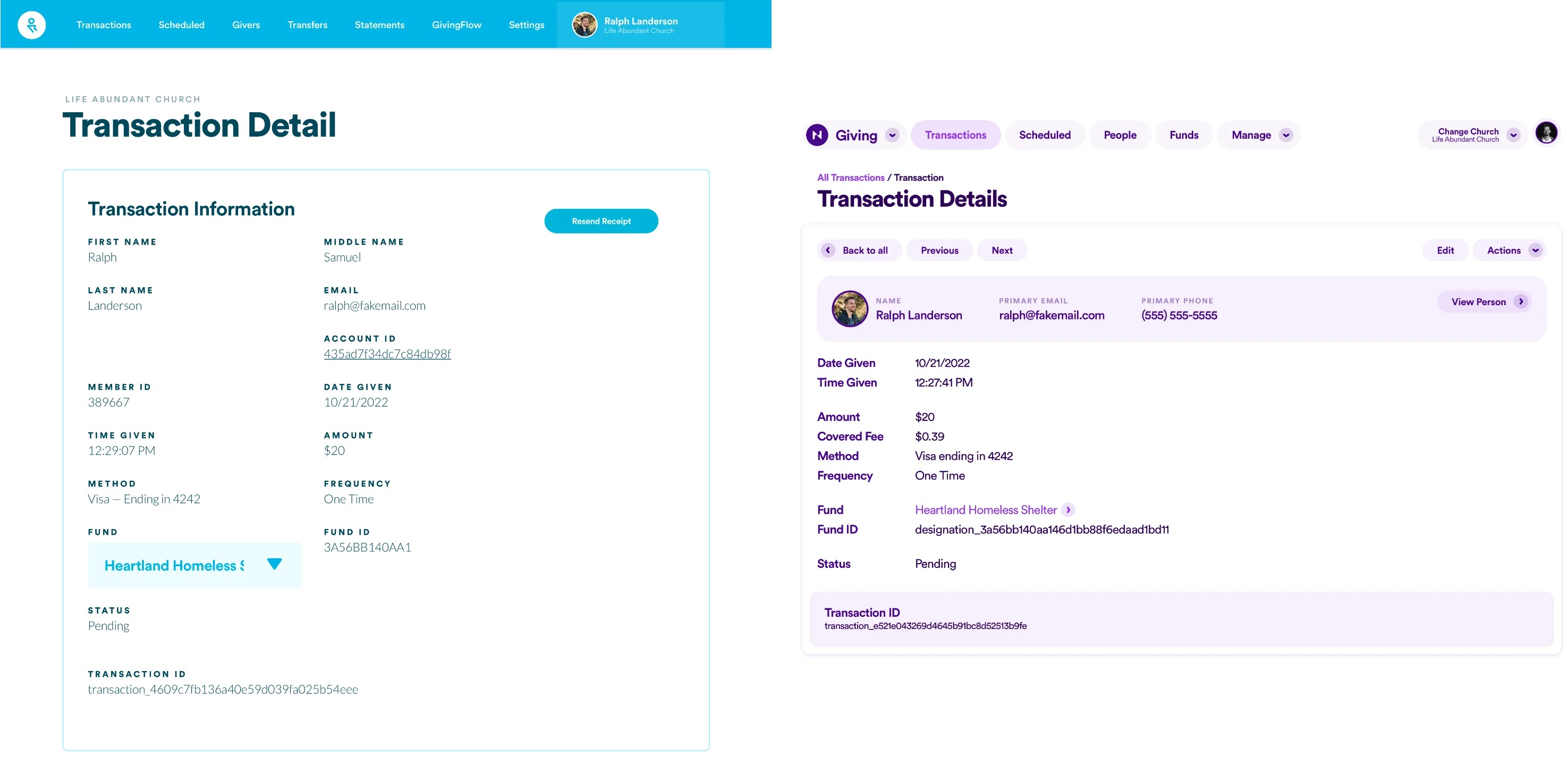
The transaction detail view is more helpful, organized, and clear, with an actions menu for common tasks like resending a receipt, editing a transaction, or issuing a refund. If the gift came from a scheduled or recurring gift, you can jump straight to that schedule.
Improved scheduled and recurring giving details and controls
Each recurring gift now shows a list of all transactions it has generated so far, along with easy ways to edit or deactivate the schedule right on the page if the donor requests it.
Improved "My Giving" view for donors
This panel now includes stats, improved filtering, downloadable reports, and statements, making it easier than ever for donors to manage their giving and see their history.
Choose whether your TIN appears on receipt emails
If you'd prefer to protect your church's TIN, you can hide it from donation and payment receipt emails.
And more, including:
- Improved receipt lookup tool
- More statement settings
- Redesigned statements
- Admin ability to reassign any donation to another giver, including bulk reassignment tools
- Smarter "unassigned" gifts that Nucleus automatically links to the right person's statement
- A host of new Nucleus admin and congregation tools to help your church
Transitioning from RebelGive to Nucleus Giving
We know migrating from one platform to another can feel like a big task, so here's exactly what to expect:
- All your data comes with you. The product framework and payment processing that power RebelGive are identical to Nucleus Giving, so all of your church's giving data and donor history come with you with zero effort.
- Same team, same values. The company behind Nucleus is the same company behind RebelGive. We share the same values, and we're the same people serving your church. It's just easier to have our products under one name and in one dashboard.
- Free congregation tools. When you move to Nucleus Giving, you'll immediately get access to the Nucleus Next Steps Launcher and Nucleus Prayer for free. These tools live alongside your GivingFlow and create new next-step opportunities for your church.
- Legacy zero-cost ACH plans. If your church is on a legacy RebelGive plan that includes zero-cost ACH processing, that won't carry over to Nucleus Giving. In exchange, we've introduced tiered pricing based on church size, making Nucleus Giving even more accessible.
- Keep your existing price. Don't want to change your pricing plan? No problem. When you contact support to begin the migration, we'll review your current plan and let you know if you qualify for other Nucleus products as free add-ons (e.g. Nucleus Flows, People & Messages).
How the migration works
The migration requires a little help from our Customer Success team. We'll make sure your two accounts are properly linked (this is crucial to bringing all of your data with you) and that you receive any bonus Nucleus products you're entitled to based on your current pricing plan.
We're also happy to answer any questions before you migrate, so you feel comfortable with the process.
Ready to get started?
Email our team. We'll answer your questions and, when you're ready, start the transition.